Guide · 3D tools
Can your printer handle PETG, ABS or nylon? Check before buying filament
You buy a spool of ABS, load it, and halfway through the print the corners peel off the bed. That's not bad luck: not every printer can print every material. Each filament demands minimum temperatures and hardware, and if your printer falls short, no slicer setting will save you. Here's what each material asks for and how to check your model in seconds, before spending money on spools.
Why not every printer prints everything
Filament compatibility is decided by four machine specs, not by the slicer:
- Max nozzle temperature. The hard limit. Many budget hotends have a PTFE liner inside that degrades from ~240-250 °C, so the manufacturer caps the temperature. If the nozzle can't reach what the material needs, no trick will fix it.
- Max bed temperature. Materials that shrink as they cool need a heated bed to hold on. The classic case is PETG, which wants 70 °C or more to stick well.
- Enclosure. ABS, ASA, nylon and polycarbonate warp if a draft hits them while cooling. A closed chamber keeps the air warm and still — and contains ABS/ASA fumes as a bonus.
- Extruder type. For flexible filaments like TPU the path matters: a direct-drive extruder pushes the filament right above the hotend; a bowden setup runs it through a long tube where flexibles buckle and jam.
What each material demands: the thresholds
These are the minimums we apply to every printer-material cell in the compatibility matrix:
| Material | Nozzle | Bed | Enclosure? | Extras |
|---|---|---|---|---|
| PLA | ~190-220 °C | Cold or warm | No | None: any FDM printer handles it |
| PETG | ≥230 °C | ≥70 °C | No | Good adhesion (glue or PEI) if the bed runs low |
| TPU | ~220-250 °C | — | No | Direct-drive extruder (ideal) and low speed |
| ABS | ≥240 °C | — | Yes (warping and fumes) | Ventilation recommended |
| ASA | ≥240 °C | — | Yes | Like ABS, but UV-resistant (outdoor) |
| Nylon (PA) | ≥250 °C | — | Yes | Well-dried filament; hardened nozzle for fibre blends |
| Polycarbonate (PC) | ≥270 °C | — | Yes (heated chamber ideal) | Hardened nozzle for fibre blends |
Notice the ladder: from PLA (no requirements) to PC (270 °C plus an enclosure) is a huge jump. That's why a sub-€200 starter machine prints PLA beautifully yet can't produce reliable nylon. If you're weighing the three most common materials, we have a full comparison of PLA vs PETG vs ABS.
How to check your printer in 30 seconds
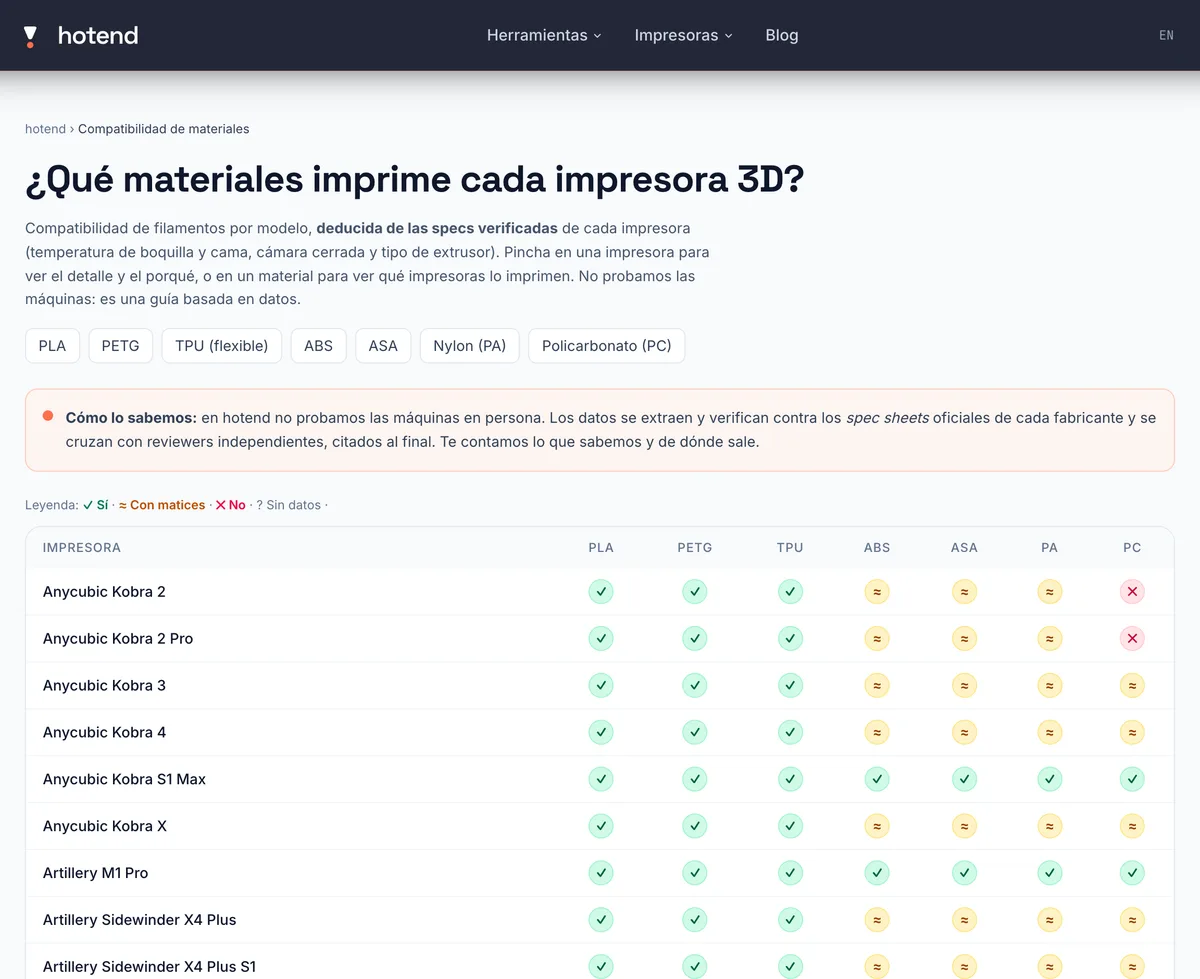
- Open the material compatibility table. It's free, no signup, and runs in your browser like every hotend tool: nothing to upload or type in.
- Find your printer in the list (rows) and scan its line of traffic lights: one symbol per material, seven in total.
- Click the printer to see the reason behind every verdict, quoting the numbers from its verified specs.
- No printer yet? Go the other way: click a material (say, PETG or nylon) and you'll see which models in the catalogue print it, which do with caveats, and which don't.
How to read the verdicts (and what “with caveats” means)
Every cell in the matrix comes from deterministic rules applied to the model's verified specs. We don't test the machines: we run the thresholds above against the real numbers on each spec sheet, and show you the why.
- ✓ Yes — the printer meets everything the material asks for. Example: a 300 °C nozzle and an enclosure for ABS.
- ≈ With caveats — it can, but you'll have to put in extra work. The usual suspects: PETG with a bed below 70 °C (fix it with glue or PEI), ABS/ASA on an open frame (draft-free spot or a DIY enclosure), TPU through a bowden extruder (slow, with harder TPU), or PC on an enclosed machine that tops out at 260 °C (only “easy” PC blends).
- ✕ Not recommended — it fails a hard requirement, almost always nozzle temperature. You can force it, but the result won't be reliable and the spool isn't worth it.
- ? No data — we're missing the verified spec for that cell. Rather than invent a verdict, we leave it blank; confirm it on the manufacturer's sheet.
The key nuance: “with caveats” isn't half a yes — it's “yes, if you do your part”. If it's your first spool of that material, budget for a few failed prints while you dial it in.
What if your printer is resin?
Then this table doesn't apply: resin printers don't use filament. The good news is compatibility gets much simpler: almost all are open systems that accept standard 405 nm UV resins from virtually any brand — standard, ABS-like, water-washable, flexible or castable. Engineering and high-temperature resins depend more on LCD power and ventilation; there, follow the resin maker's guidance.
Before you buy the spool (or the printer)
The right order is: decide what you want to print, work out which material survives that use, and then check whether your machine can handle it. If you're choosing a printer instead, flip the flow in the same tool: start from the material you need and only shortlist the models in green. And if your question is more basic — “is PLA enough or do I need more?” — start with the guide on which filament to pick: for most household parts, PLA or PETG is plenty, and nearly every modern machine prints those.
Frequently asked questions
- Can I print ABS on an open-frame printer?
- With caveats. If the nozzle reaches 240 °C, ABS is possible on an open printer, but it warps in drafts and gives off fumes: print in a draft-free, ventilated spot, or add an enclosure. On a printer that's enclosed from the factory, the problem goes away.
- My printer shows “with caveats” for PETG — what do I do?
- It almost always means the nozzle reaches 230 °C but the bed stays below 70 °C, which is where PETG sticks best. You can still print it by working on adhesion: glue stick or hairspray on the bed, or a PEI surface.
- Does TPU work with a bowden extruder?
- It's possible, but awkward: flexible filament buckles inside the long tube and causes jams, so you have to print slowly and pick a harder (high-shore) TPU. TPU runs far better on a direct-drive extruder — that's why the matrix marks direct drive “yes” and bowden “with caveats”.
- What does the “no data” verdict mean?
- That we're missing the verified spec needed for that cell (for example, the real max nozzle temperature or the extruder type). Rather than guess, we say so: confirm it on the manufacturer's spec sheet before buying.
- Do I need a special nozzle for nylon or polycarbonate?
- For plain nylon or PC, no: reaching their temperature is enough. For carbon- or glass-fibre variants (PA-CF, PC-CF…), yes: they're abrasive and eat brass nozzles, so a hardened-steel nozzle is the way to go.